

Here's a mistake I made for months.
I'd type “photorealistic” into the prompt, hit generate, and wonder why my AI ads still looked like AI ads. Glossy. Too clean. That plastic sheen a trained eye clocks in half a second.
The word wasn't broken. I was using one word to do five different jobs.
Because “photorealistic” isn't a magic switch that makes an image real. It's one of at least five triggers - and each one tells the model to behave like a different kind of camera. Pick the wrong one and you get an image that's technically sharp and completely fake.
This is the exact trigger system I use to make AI creative look shot, not painted. Five triggers, when to reach for each, and the prompt keywords you can paste straight in.
Let me show you how to make the AI behave like a camera instead of a paintbrush.
What Are Photorealism Triggers?
A photorealism trigger is a prompt keyword (or phrase) that points an image model at a specific set of real-world photographic references - studio work, candid snapshots, macro detail, film frames, or a named camera body. Each trigger produces a different flavor of “real.” Choosing the right one is the first decision in the prompt, before subject or style.
Most people treat these triggers as interchangeable - just words that make something more real.
They aren't. And that misunderstanding is why most AI ads look off.
Why “Photorealistic” Alone Does Nothing
Here's the framework that fixes this. I call it Realism Dialects:
Realism Dialects: “real” is not one setting. Each photorealism trigger speaks a different dialect of photographic real - studio, candid, macro, cinematic, hardware. An ad feels fake when the dialect doesn't match the placement, even when the image is technically flawless.
Think about what that means for a UGC hook.
A testimonial ad shot in flawless studio light with perfect composition doesn't read as “high quality.” It reads as staged. The dialect is wrong. Your viewer wanted a real person in a real bathroom, and you handed them a commercial.
The reverse is just as bad. A premium serum rendered with candid iPhone grain looks cheap, not authentic.
So the job isn't “make it real.” The job is: which real? Match the trigger to what the placement expects, and the model starts building the right image before you've described a single detail.
Side note
The 5 Photorealism Triggers
For each one: what it tells the model, when to run it, what to watch for, and paste-ready keywords.
1. "Photorealistic" & "Ultra-Realistic" - the studio trigger
The commercial-grade trigger. It points the model at high-end photography - studio product shots, editorial portraits, campaign work. The output is sharp, controlled, technically excellent. Clean, directional light. Every surface rendered at its best.
- Use
- product shots, premium beauty, editorial macro - any creative where technical quality is the primary signal
- Avoid
- on its own, this trigger overshoots straight back into render territory. Everything gets too sharp, too clean, too perfect. Always pair it with an imperfection term.
photorealistic
ultra-realistic
photorealistic commercial photography
ultra-realistic editorial quality
natural imperfections, clean but not overly polished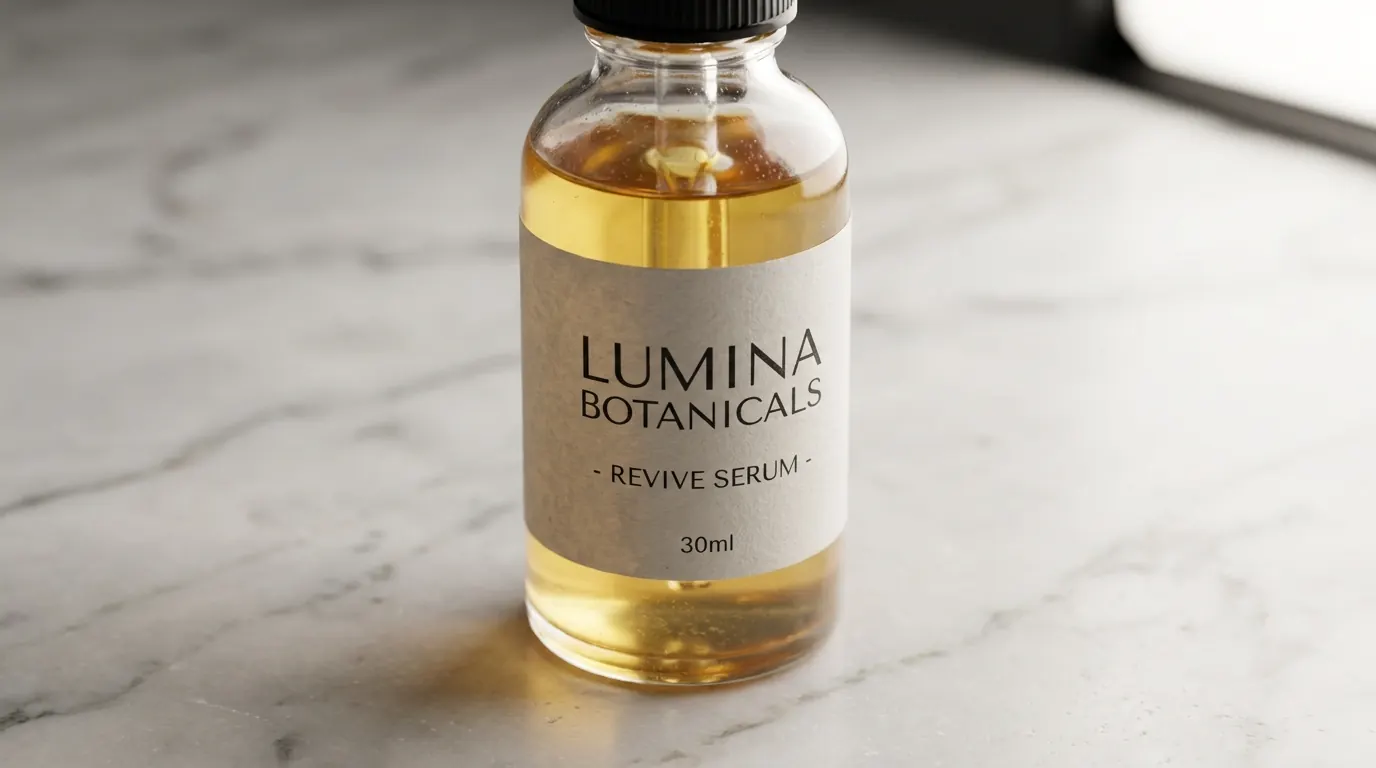
What you see: the glass refracts light correctly, the marble has specific veining, the label is crisp. That last line - natural imperfections, clean but not overly polished - is what keeps it on the photographic side of the line instead of tipping into render.
2. "Real-World Photography" & "Candid Photograph" - the authenticity trigger
The antidote to AI gloss.
This tells the model to reference photos taken in the real world, by real people - no studio, no controlled light, no perfect composition. You get natural light variation, slightly imperfect framing, a hint of grain, believable environments. The feeling that someone was in the room with a camera when the moment happened.
- Use
- UGC hooks, testimonial ads, lifestyle content, problem/solution creative - anything where the viewer needs to feel they're watching a real person, not a model
- Avoid
- left unguided, this can default to a blurry phone snapshot. Add a lens and a lighting note to keep the "high-quality candid" feel instead of "potato camera."
real-world photography
candid photograph
unposed real-world photography
candid iPhone aesthetic
documentary candid, real moment captured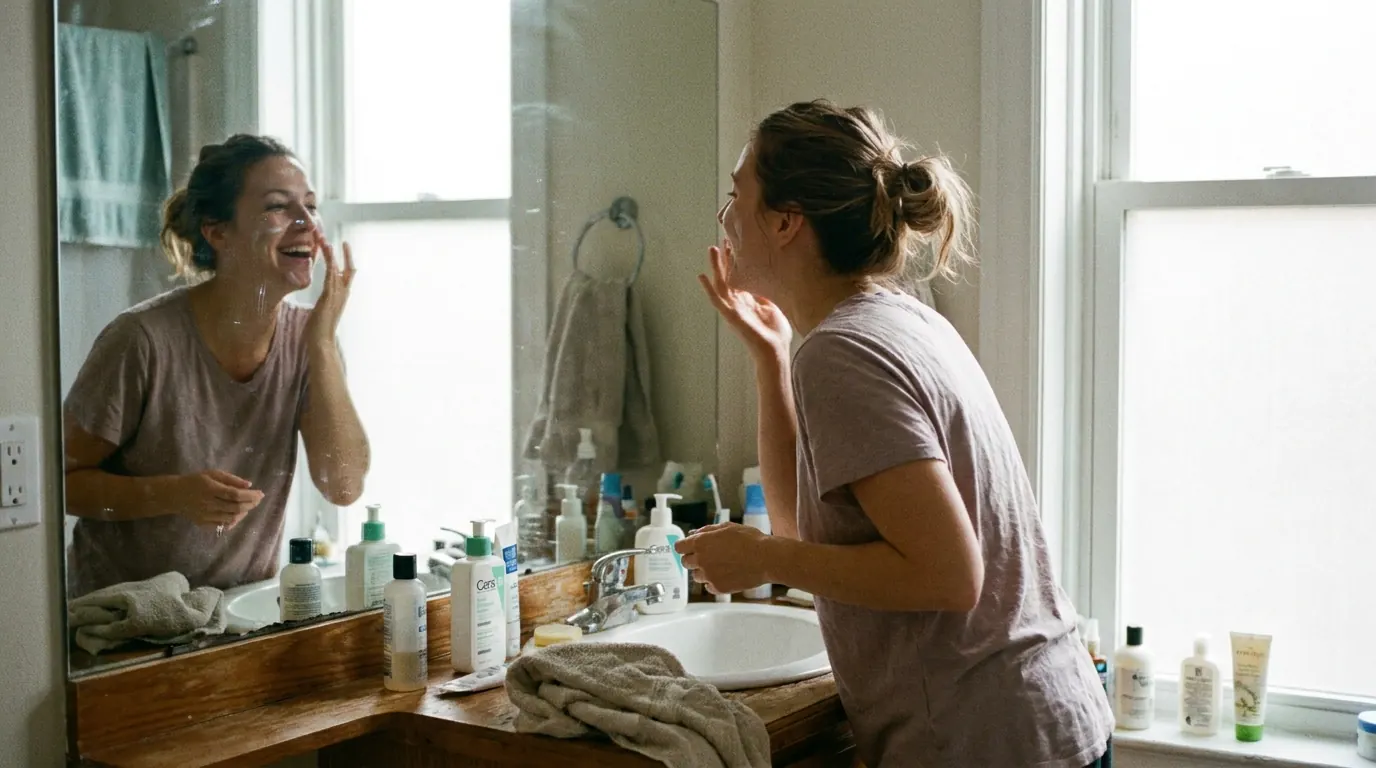
What you see: the frame isn't perfectly composed - there's slight asymmetry. The light is natural and uneven. It looks like a real bathroom, not a set. The whole thing feels caught by someone who happened to be there.
3. "Lifelike Details" & "Macro Photography" - the texture trigger
Where the first two triggers set the personality of the whole image, this one is about the physical fidelity of one surface.
It tells the model the most important content is micro-level detail: skin pores and peach fuzz, the woven threads of fabric, individual condensation droplets on a cold glass.
- Use
- skincare close-ups, fabric and material shots, food and beverage texture, before/after skin comparisons - any creative where the surface is the proof
- Avoid
- apply this to a full-body or wide shot and every surface renders at macro sharpness at once. Use it only when the shot is genuinely close and texture is genuinely the subject.
lifelike details, macro photography
lifelike skin texture, macro detail
micro surface detail, lifelike material texture
tactile surface quality, true-to-life texture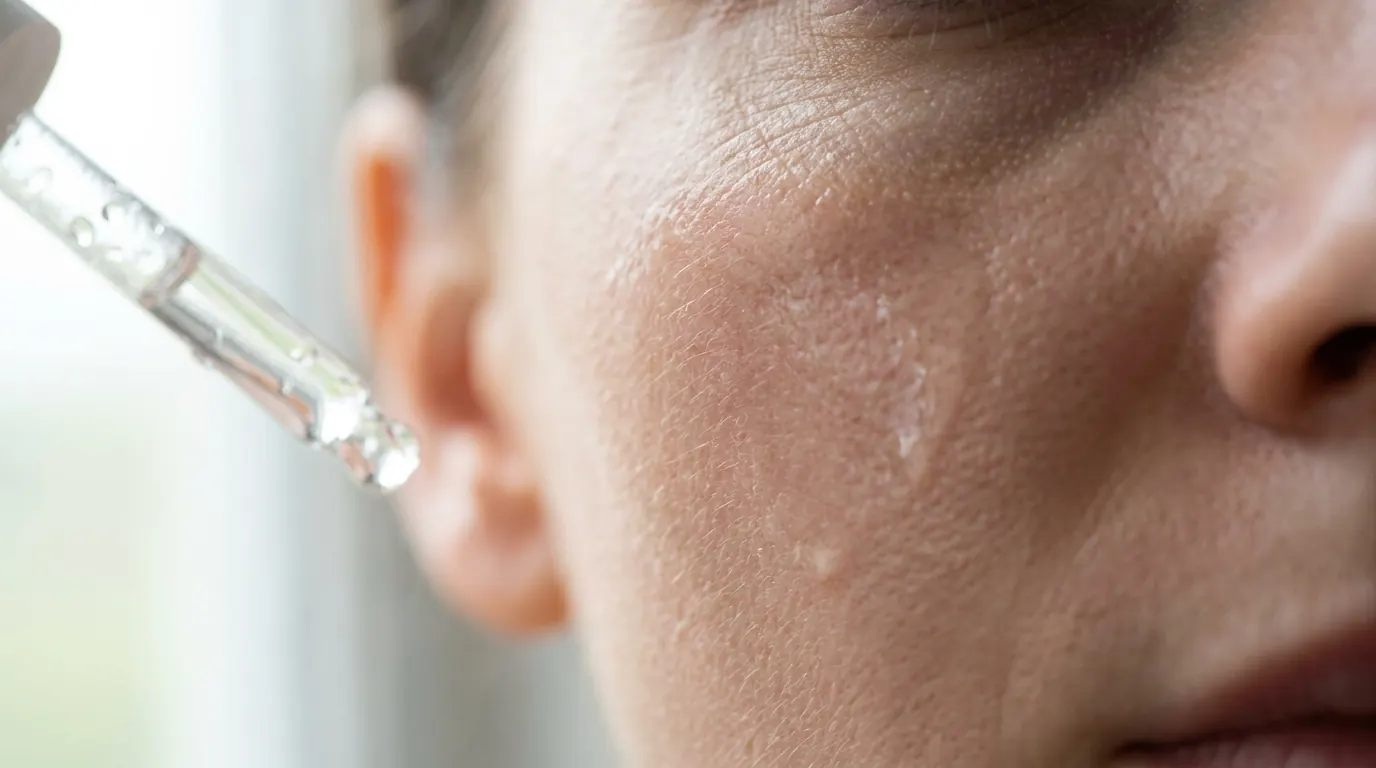
What you see: individual pores. Facial hair catching light as separate strands. A shot where texture is the entire content.
4. "Cinematic Realism" & "Film Still" - the cinematic trigger
This points the model at frames from real films rather than studio stills - a different category with its own visual language.
You get deliberately composed, emotionally weighted images with the color grading and light quality of a well-shot film. Not as sharp as photorealistic, not as raw as candid photograph. Something in between that carries both quality and feeling.
- Use
- premium lifestyle, aspirational brand campaigns, any creative with an emotional rather than purely commercial register
- Avoid
- cinematic triggers drift toward slightly desaturated, slightly cool grading. If you need warmth, add a color-temperature instruction alongside it.
cinematic realism
film still
true-to-life cinematic
natural cinematic quality, not a render
photorealistic film still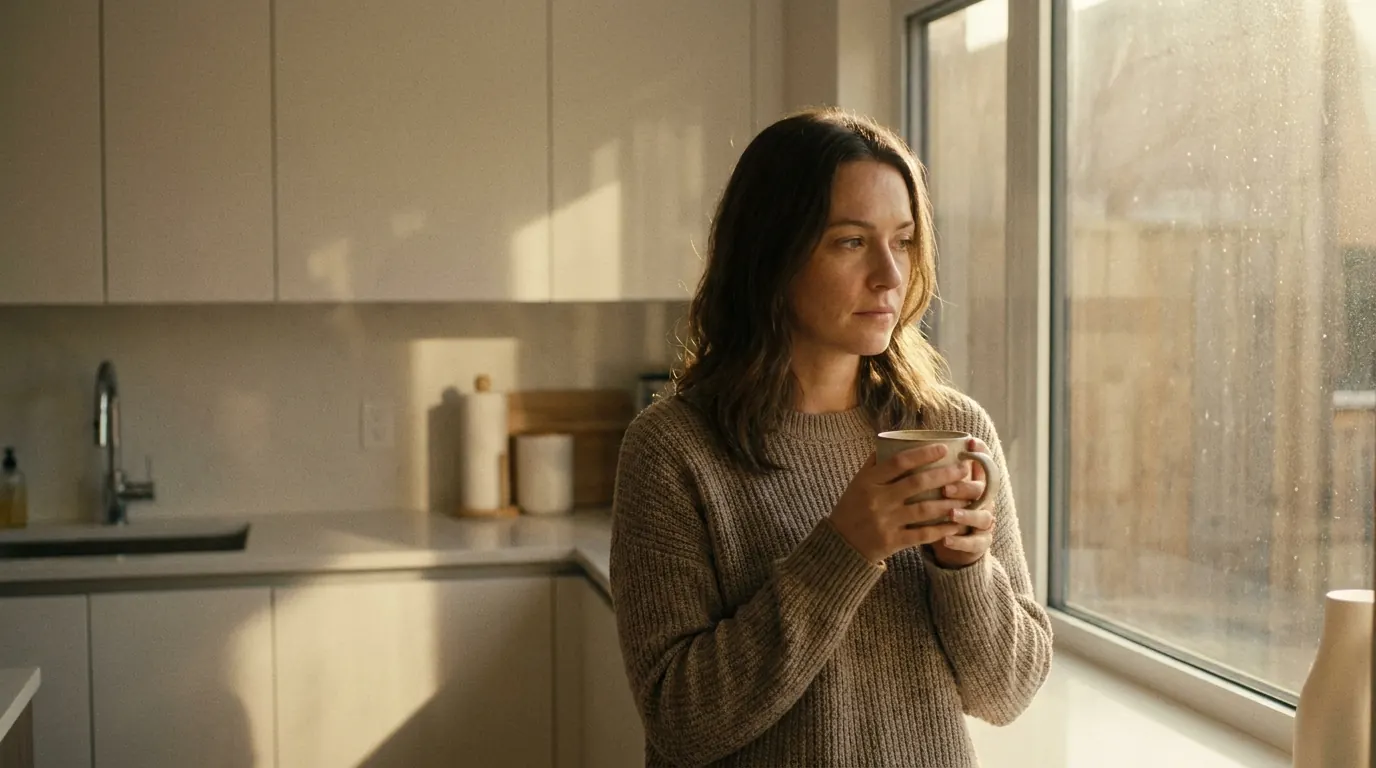
What you see: the light is beautiful but naturalistic. The composition is considered without looking posed. Not a commercial, not a snapshot - the in-between.
5. "Shot on [Specific Camera]" - the hardware trigger
My single most reliable realism signal.
Naming a real camera body points the model at that camera's actual visual characteristics - its color science, resolution, optical quality. It works because it anchors the output to a specific physical device that makes real photographs, instead of a vague idea of "quality."
- Use
- any realistic prompt where you want a specific look - the warm color science of a Sony, the clinical sharpness of a Hasselblad, the full-frame quality of a Canon
- Avoid
- it only works if the model has training data for that camera. Well-known pro bodies are reliable. Obscure or brand-new models produce inconsistent results.
shot on Sony A7R IV
shot on Canon EOS R5
shot on Hasselblad H6D
captured on iPhone 15 Pro
shot on Fujifilm X-T5
What you see: the specific color rendering and full-frame sharpness of that sensor. The camera name does more work than any generic quality word - because it points to a known output instead of a category.
The Trigger Decision Matrix
Choosing the trigger is one decision, and it happens before anything else in the prompt. Ask one question: what's the primary job of this creative?
| The job | Reach for |
|---|---|
| Demonstrate product quality at max fidelity | photorealistic, ultra-realistic |
| Make the viewer feel a real person uses this | real-world photography, candid photograph |
| Show a texture or surface as proof | lifelike details, macro photography |
| Create an emotional lifestyle moment | cinematic realism, film still |
| Signal a specific camera quality | shot on [camera body] |
Demonstrate product quality at max fidelity
Reach for
photorealistic, ultra-realisticMake the viewer feel a real person uses this
Reach for
real-world photography, candid photographShow a texture or surface as proof
Reach for
lifelike details, macro photographyCreate an emotional lifestyle moment
Reach for
cinematic realism, film stillSignal a specific camera quality
Reach for
shot on [camera body]
Pick one primary trigger. Add one supporting trigger if you need it.
The catch? Never stack more than two triggers from different categories in the same prompt. They speak different dialects - and they'll fight.
Stacking Triggers: The Full Realism Prompt
Here's what a controlled stack looks like - one primary trigger, supporting modifiers, and negatives to hold the line:
Real-world photography, candid photograph of a woman in her early 30s in a
minimal morning kitchen, holding a ceramic coffee cup in both hands,
unposed natural moment, shot on Sony A7R IV with a 35mm lens, soft natural
window light from the left, lifelike skin texture, true-to-life material
textures, natural imperfections, cinematic realism, clean but not overly
polished, no CGI, no staged stock photography, no plastic skin
Notice the hierarchy. Real-world photography leads - it's the primary dialect. The camera body, the texture note, and the light cinematic touch support it. And the negatives at the end fence off the render.
Pro Tip
For most ad creative, real-world photography + candid photograph will beat photorealistic every time - because your customers trust what looks real over what looks perfect.
Note
Conclusion: Match the Dialect First
Four things to take to your next batch:
1. “Real” isn't one word - it's five dialects. Studio, candid, macro, cinematic, hardware. Each produces a different flavor of real.
2. Match the trigger to the job, not to your habit. Run the decision matrix: what's the primary job of this creative? The answer picks the trigger.
3. Always tax the studio trigger with imperfection. photorealistic alone snaps back to render. Pair it with natural imperfections or clean but not overly polished.
4. Name the camera. “Shot on [real body]” is the highest-leverage realism word you're probably not using.
So here's my question: open your last three AI ads and check which trigger you actually used. My bet is all three say “photorealistic” - and at least one of them wanted a different dialect entirely.
Fix that one first.
Steal my ad concept & hook library
Every prompt, archetype, and hook I use in my own accounts. Updated weekly.
Join the free Skool community